Case Study
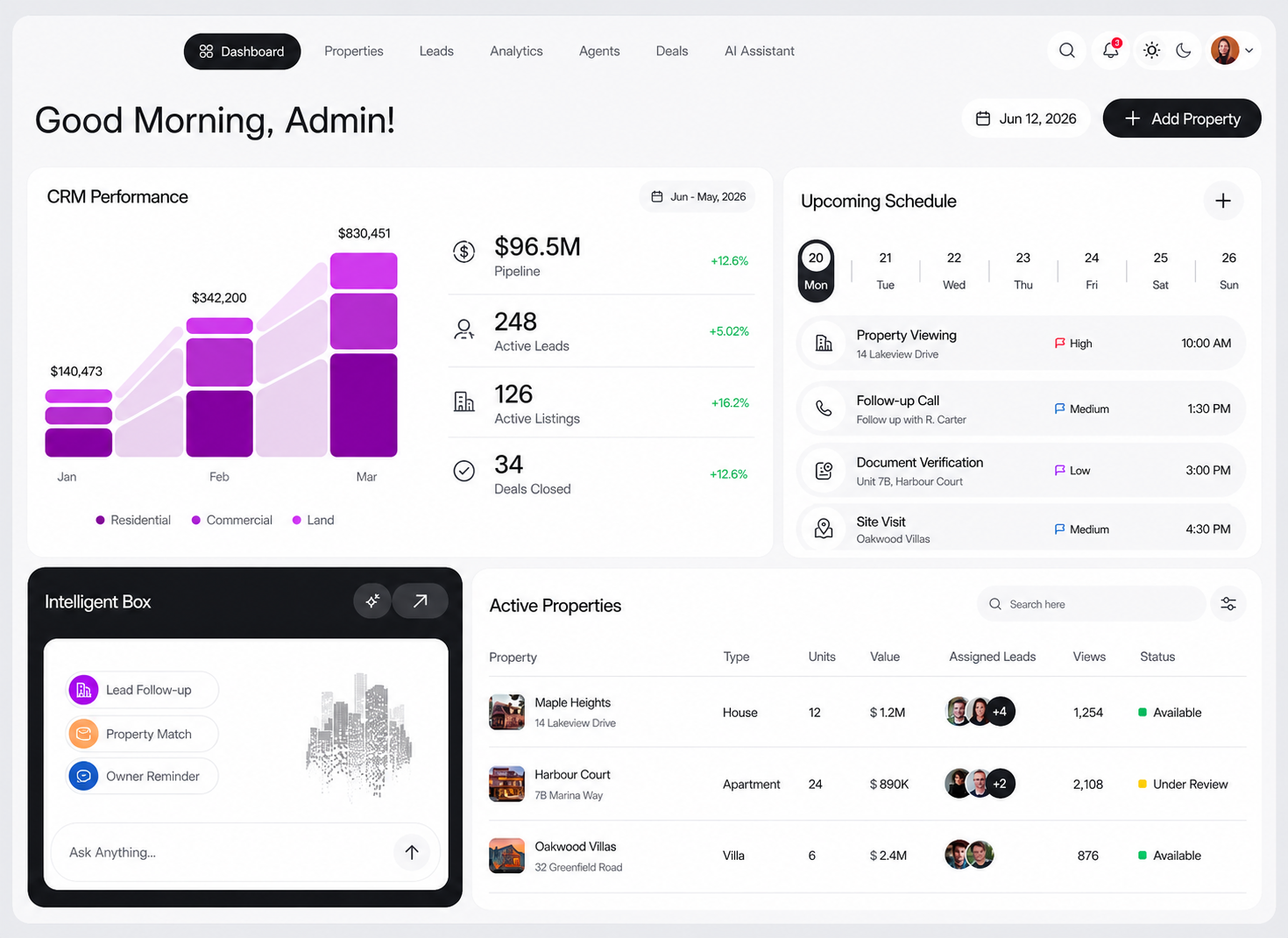
Real Estate CRM Dashboard
Single view
properties, leads, and tasks
Faster
client follow-up across teams
Clearer
pipeline visibility for managers
Product experience
A command center for daily real estate work
The CRM experience is organized around the work real estate teams handle every day: review active listings, assign leads, schedule site visits, verify documents, follow up with buyers, and keep deal movement visible.
01
Dashboard overview
Teams start with pipeline value, active leads, active listings, closed deals, and category-level performance.
02
Leads workspace
Lead lists, assignments, follow-up timing, and source activity stay visible for the team.
03
Analytics view
Managers can review pipeline movement, lead volume, listing activity, and conversion trends.
04
Agents view
Agent assignments, workload, active follow-ups, and ownership status are easier to scan.
Product workflow
Dashboard
Leads
Analytics
Agents
About the product
CRM software for real estate operations
The product gives a real estate team one system to manage listings, leads, schedules, document tasks, and deal follow-up without switching between spreadsheets, chats, and separate tracking tools.
Business context
Real estate work depends on fast coordination
Real estate teams handle many moving pieces at once: fresh property listings, interested buyers, owner communication, viewing slots, agent assignments, document checks, and deal-stage updates. Without a central CRM, follow-up can become inconsistent and managers lose visibility into what needs attention.
The challenge
Create one CRM view for listings, leads, and schedules
The CRM needed to be simple enough for daily use while covering the full operational flow from property intake to lead follow-up and deal progress.
- Centralize property records with type, units, value, views, and availability status.
- Track active leads and connect them to listings and assigned team members.
- Surface upcoming property viewings, calls, site visits, and document verification tasks.
- Give managers pipeline and performance visibility without manual reporting.
- Support faster follow-up through reminders and AI-assisted prompts.
What QtaSO delivered
A focused CRM dashboard for team productivity
QtaSO designed and built the CRM experience around the real estate team’s daily workflow. The interface combines analytics, scheduling, lead tracking, property inventory, status management, and intelligent follow-up prompts in a clean dashboard.
- Real estate CRM dashboard and workflow design.
- Property and listing management views.
- Lead tracking, assignment, and follow-up support.
- Schedule management for calls, viewings, site visits, and document checks.
- Pipeline and category performance analytics.
- AI assistant panel for follow-up reminders and property matching prompts.
Impact
Cleaner operations for busy real estate teams
The finished CRM gives teams a faster way to understand what is active, what needs follow-up, and where each property or lead stands. It reduces operational friction by bringing the team’s property pipeline, schedule, and customer follow-up into one shared system.
CRM workflow
Real Estate Operations Flow
01
Lead capture
02
Property pipeline
03
Follow-up reminders
04
Site visit scheduling
05
Document readiness
06
Deal progress
07
Client communication
CRM output
A single dashboard for real estate decisions
The final system gives teams a scan-friendly workspace for pipeline value, lead volume, listing status, upcoming tasks, and property activity.
Render-ready formats for listing pages, social feeds, ads, and sales follow-up
Next step
Ready to automate video production?
Turn property data, media assets, and campaign rules into a repeatable AI-powered workflow.